Productivity tools I use
Contents
- 잡담
- 자주 쓰는 어플리케이션들
- 1. Trello [ link ]
- 2. Google Calendar [ link ]
- 3. inbox [ link ]
- 4.Noisli [ link ]
- 5. AppBlock [ link ]
- 6. RescueTime [ link ]
- 7. Marinara [ 링크 ]
- 결론
- Chitchat
- Applications I use often
- 1. Trello [ link ]
- 2. Google Calendar [ link ]
- 3. inbox [ link ]
- 4.Noisli [ link ]
- 5. AppBlock [ link ]
- 6. RescueTime [ link ]
- 7. Marinara [ link ]
- Conclusion
- Chitchat
- Applications I use often
- 1. Trello [ link ]
- 2. Google Calendar [ link ]
- 3. inbox [ link ]
- 4.Noisli [ link ]
- 5. AppBlock [ link ]
- 6. RescueTime [ link ]
- 7. Marinara [ link ]
- Conclusion
- Chitchat
- Applications I use often
- 1. Trello [ link ]
- 2. Google Calendar [ link ]
- 3. inbox [ link ]
- 4.Noisli [ link ]
- 5. AppBlock [ link ]
- 6. RescueTime [ link ]
- 7. Marinara [ link ]
- Conclusion
잡담
일을 같은 시간동안 더 많이 할 수 있다면 얼마나 좋을까? 낮에 하루종일 딴짓만 하다 야근하며_
효율적이고 싶었다. 야근을 하기 싫었다. 야근이 많은 건 내가 게으르기 때문만은 아니지만...
만약에 내가 두배 효율적이게 된다면, 그럼 내가 10시간 걸려서 하는 일들을 5시간 걸려서 한다면, 남은 5시간동안 게임을 할 수 있잖아..!(라고 생각했다). 그러다가, 타이탄의 도구들라는 책을 읽게 되었다. 여기서 언급하는 방법을 읽고, 그리고, 이 아저씨가 쓴 다른 블로그 포스트 Apps I Use을 읽고 몇 가지 습관을 만듬으로서, 일을 효율적이게 하고, 삶의 질을 높일 수 있는 방법이 있다는 사실을 알게 되었다.
삶의 질을 높이고 일을 효율적이게 하는 방법이 정말 있는가?...? ㄹㅇ 괜찮은가? 이게...? ㄱㅊ?ㄱㅊ늠? ㄹㅇ루? 하는 생각을 했다. 한참 뒤에, 일을 정말 효율적으로 하지 못해서 죽을 뻔 한 경험을 한 뒤, 왠지 생산성을 높여야 한다는 생각이 들었다. 글의 저자나, 수많은 사람이 이러한 도구를 사용해 더 생산적이고, 효율적이게 변했다고 한다. 뭐, 글을 쓴 사람이야 책을 팔려고 거짓말을 하고 있겠지 생각했지만 수많은 사람들이 그렇게 말하니까 뭐..., 한번 따라해 보기로 했다.
새로운 습관을 들이는 일은 정말 어렵다. 아무리 좋은 변화라도, 새로운 시도는 J커브 때문에 초기에는 성과 저하가 나타날 수 있다. 나에게도 역시 역시 나타났다. 하지만 저 무수한 댓글들을 보고, 역시 조금만 더 따라해보기로 했다. 포기도 많이 했다.
하지만, 흠... 명상을 한다던가, 일기를 쓴다던가, 일에 집중을 한다던가 하는 좋은 습관들을 도와주는 도구가 이 세상에는 많다. 이제 제법 생각보다 익숙해진 것 같다. 좋은 습관을 들이려는 노력도 중요했지만, 이 도구들이 날 도와준 것 같다. 이제는 몇 가지의 생산성 도구, 생산성이라 부르기는 뭐한 것들까지, 들에 어느 정도 익숙해 진 것 같다.
이제는 이 도구들을 사용하지 않는다면 일을 하지 못 할 지경에 이르렀다는 생각이 든다.
이 결과는, 음... 지금의 내가 과거의 내가 처리하지 못 할 정도의 많은 일을 일상적으로 처리하고 있어서, 이 도구들을 포기한다면 지금과 같은 output을 내지 못하기 때문이라고 생각한다. 예를 들어, Google Calendar가 없으면 난 내가 해야 할 약속들을 전혀 관리할 수 없다. Inbox가 없으면 무수히 많은 종류의 무수히 많은 메일을 확인할 수 없을 것이다.
즉, 예전보다 내가 나아진 것 아닐까? 헤헤...
화장을 맨날 하는 여성은 화장한 얼굴이 자기 얼굴 같다고 하고, 깔창을 매일 끼는 남자는 깔창 꼈을 때의 키가 자기 키 같다고...
음... 더 많은 일을 하게 됬다고 해서 무작정 좋은 것은 아니고, 실제로 나의 여가시간의 절대량은 늘지 않았는데, 이유는 다음과 같다.
-
나는 Project-based가 아니라 시급 기반으로 임금을 받는다.
- 한 가지 일을 마치면 다른 일을 해야 한다.
- 이건 어떻게 합리화해야할까. 지금 내게 가장 중요한 요소는 돈보다는 성장이다. 내 전문 분야로 삼고 싶은 부분에 있어서도, 인간적으로 좋은 사람이 되는 것에 대해서도. 생산성 어플리케이션들을 이용해 관리를 시작한 이후로 내게 생기는 변화가 마음에 든다.
- 한 가지 일을 마치면 다른 일을 해야 한다.
-
여유 시간을 몰아서 사용하게 되었다.
- 직접적으로 여유 시간이 늘어난 것도 있지만, 짜잘한 여유 시간을 뭉텅이 시간으로 바뀌었다.
- 같은 시간 일을 한다고 해도, 일을 Batch로 처리해 여유 시간을 2시간 만드는 것과, 적당적당히 효율성이 낮게 일을 해 30분의 여유 시간을 4개 만드는 것은 차원이 다른 것 같다. 페이스북이나 디시인사이드나 보며 시간을 보게 되었을 시간을, 책을 한 권 읽거나, 코드 리뷰를 할 수 있는 시간으로 바꿀 수 있는 것이다.
여담이지만, 이게 Memory Fragmentation과 비슷하다고 생각했고, 이로 발생하는 문제가 꽤 심각할 것 같다고 생각했는데(Context switching time 때문에) 비슷한 주제로(Time Fragmentation) 연구가 이뤄지고 있는 것 같다. 이....이런게 학문의 연관성...융합...컨버전스.......
- 직접적으로 여유 시간이 늘어난 것도 있지만, 짜잘한 여유 시간을 뭉텅이 시간으로 바뀌었다.
-
효율적으로 시간을 쓰려고 노력하는 것 자체도 꽤 재미있다.
- "오늘도 명상을 했다."나, "철봉을 처음엔 4개 했었는데, 지금은 10개를 했어!"라던가, "하루 종일 할 줄 알았는데, 5시간 만에 끝났다능...!"같은 경험 자체가 꽤 즐겁다.
자주 쓰는 어플리케이션들
원래 자주 쓰는 어플리케이션을 시간 관리, 집중력 과 같은 카테고리로 구분해보려고 했는데, 잘 안되서 그냥 쭉 나열했습니다. 예를 들어, 저는 Noisli를 집중할 때에도 사용하지만, 명상할 때에도 사용해요. 짧은 노트는 Trello를 이용하기도 하고, 다른 아조씨에게 어떤 사항을 알리고, 나중에 다시 이 아조씨한테 notification을 받고 싶으면 바로 inbox를 켜서 메일을 보내버리기도 합니다. 어쨌건 저는 이 어플리케이션을 삶의 다양한 층위에서 이용하며, 많은 도움을 받고 있습니다.
1. Trello [link]
트렐로는 원래 소프트웨어 개발 관리를 하기 위해 나온 도구이다.
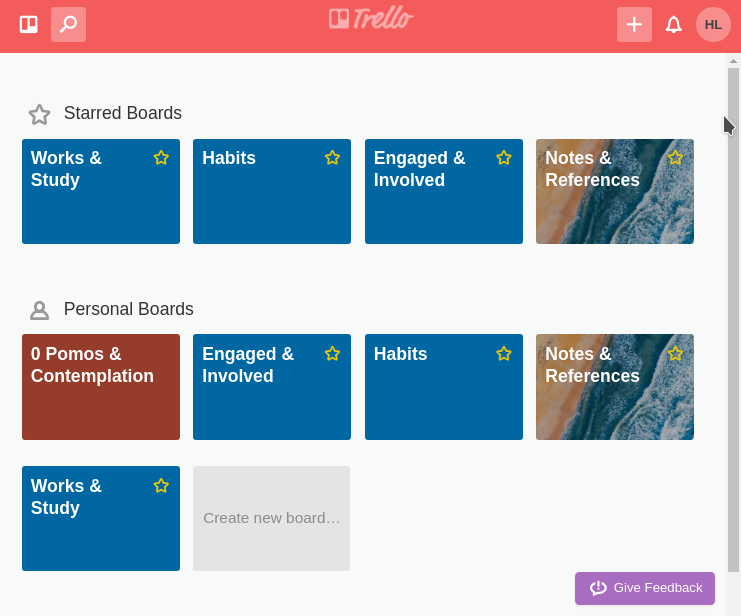 나는 내 일을 이렇게 나눈다...
소프트 스킬이라는 책의 저자가 책 내에서 팀 프로젝트용 소프트웨어지만, 개인적인 일정 관리 용도로 사용했을때에도 완벽에 가까운 도구라고 해서, 한번 다운받아 봤는데 너무너무너무 효과적이다. Todoledo?나, 다른 여러 GTD 도구를 이용했을 때보다 훨씬 "시각적이고", 편리하다.
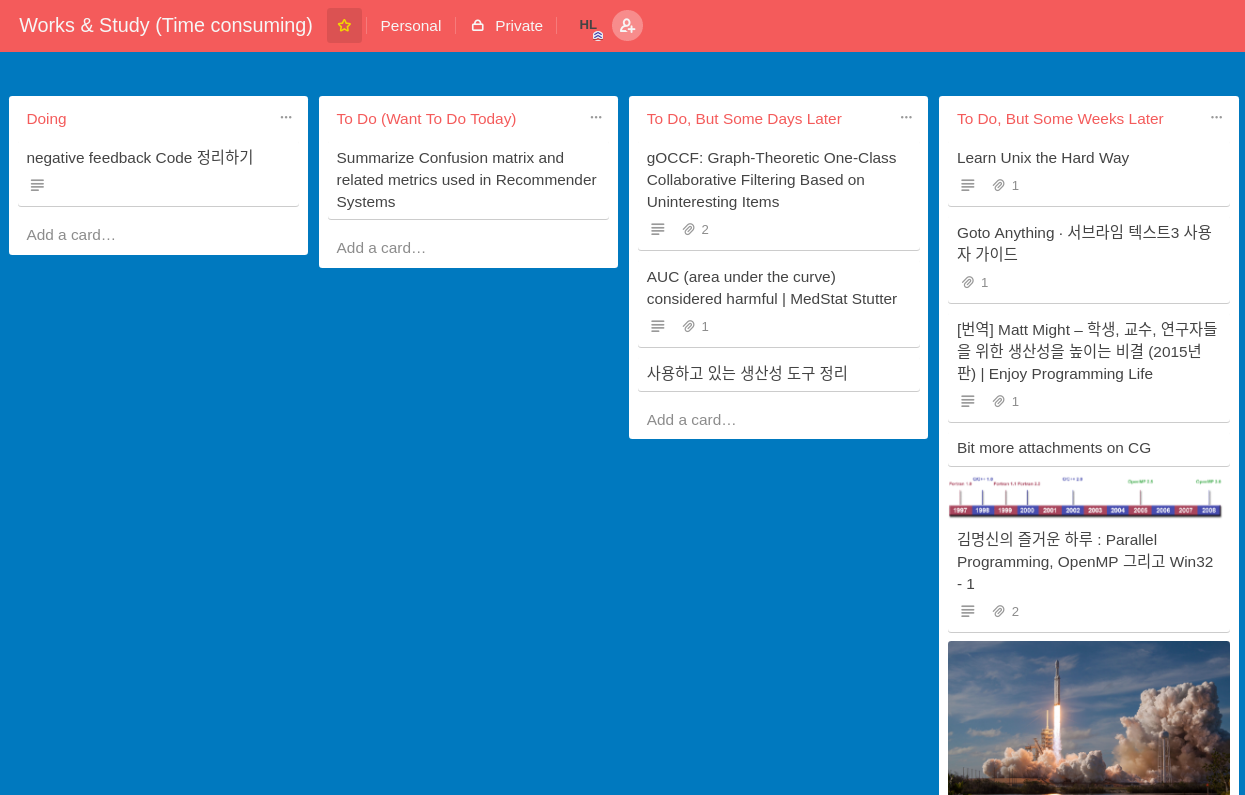 할 일을 이런식으로 나누면 (적어도 나한테는) 너무 편리하다!!
- 장점
- 시각적으로 내가 뭘 하고 있는지 쉽게 알 수 있다.
- 다양한 카테고리를 편리하게 왔다갔다 할 수 있다.
- 단점
- 시간에 관한 관리가 불편함.
- 다른 사람에게 내 작업 계획 공유하기가 불편함.
2. Google Calendar [link]
사실 다이어리를 항상 들고 다녔다. 다만, 단 한번도 잘 써 본 적은 없다. 얼마나 많은 장소에 내가 있어야 하는지, 얼마나 많은 약속을 하고 사는지, 그걸 기억력은 바퀴벌레 수준인 대가리 속에 박아넣고 있었다. 물론 산더미같은 지키지 못한 약속들과, 일정들은 자괴감을 키워주기에 차고 넘쳤다. 더 자괴감이 드는 부분은, 내가 능력이 부족해서가 아니라, 단지 그 일을 기억하지 못해서 약속을 지키지 못했다는 점이다. 상대방은 내가 " 해낼 능력이 없었다"고 생각하거나, "약속을 중요하게 생각하지 않는다"고 생각하게 된다. 사실 하고 싶은 변명은 정말 많지만, 사실이다.
기억할 능력이 없으면 외부에 저장하면 된다. 상대방과의 중요하게 생각하니까 무슨 수단을 써서라도 반드시 기억해야 한다. 이런 생각을 하니, 자연스럽게 이 어플리케이션을 사용하게 되었다. 오예...
3. inbox [link]
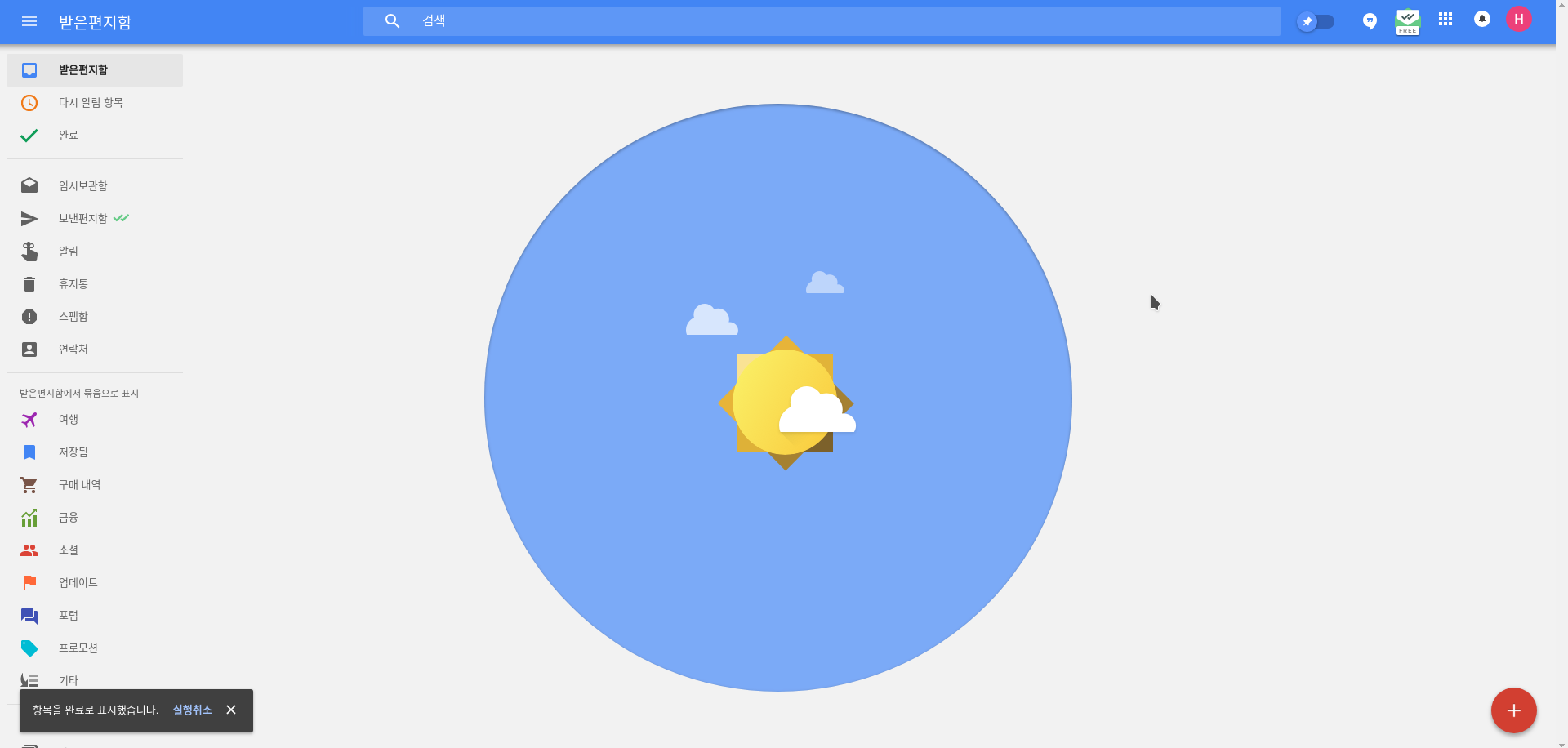 원래는 Streak을 쓰고 있었는데 음... 이게 굉장히 편하긴 한데 광고가 떠서 바꿨다. 구글이 직접 만든 건 사실 퀄리티가 처음에는 그렇게 높지 않은 것 같은데, 구글 서비스 내에서 구글이 만든 어플리케이션을 이용하면 광고가 뜨지 않는 점이 너무 좋다...!
 그래서 꾸역꾸역 쓰다 보면 점점 구글 제품(Inbox)이 자신의 경쟁자(Streak)를 이기게 된다. 매번 그랬어...
- 장점
- 메일을 확인할 때 페이지 이동이 없다.
- 통계적 학습을 이용해 메일 분류를 자동으로 해준다. 물론 맘에 안 드는 분류는 수정이 가능하다.
- Gamification을 이용해, 메일을 잘 처리하고 싶도록 유도하는 점이 너무 좋다. GTD에서 가장 어렵던, 항상 깔끔한 메일함을 유지하기를 드디어 할 수 있게 되었다..!
- 가장 좋은 점인데, 다른 여러 확장 프로그램으로 기능을 추가할 수 있다.
- 단점
- Outlook의 툴바처럼 편리한 툴바가 없고, 편리한 기능들은 단축키를 사용해야 한다.
- 행아웃 사용을 강제한다 내가 속한 모든 조직은 행아웃을 쓰지 않는다.
4.Noisli [link]
친구가 ASMR?같은 걸 자주 듣는다. 비슷한 용도로 사용한다. 보통 음악을 들으면서 공부했는데, 점차 Noisli를 사용하는 쪽으로 조금씩 옮기고 있다. 일에 조금 더 집중할 수 있는 것 같다. 사실, 무언가를 틀지 않으면 아예 공부가 되지 않는 것 같다.
또, 최근에 명상을 시작했다. 명상할 때에도 Noisli를 사용한다. 이 어플리케이션도 타이머 기능이 달려 있다. Headspace나 Calm같은 명상을 위해 만들어진 어플도 있지만, 음... 딱히 명상할 때 guide를 받고 싶지는 않고, 최대한 적은 수의 어플리케이션을 사용하는 것이 새롭게 익숙해질 것이 적다는 측면에서 생산성을 더 쉽게 향상시킬수 있을 것 같다.
5. AppBlock [link]
끊고 싶은데 끊지 못하는 것들이 있다. 점심시간에 유투브를 들어간다던가, 괜히 업무시간에 뉴스나 웹툰을 보는 일이라던가, 담배라던가, 담배라던가...
이런 것들의 공통점은, 괜히 하고 나면 후회하는 것이며, 막상 몇분 참아보면 금방 생각에서 사라진다는 점이다. AppBlock은 이런 문제를 해결하기 위해 나온 어플리케이션이다. 설정한 핸드폰 어플리케이션을 설정한 시간동안 실행하지 못하게 블록해버리는 도구이다.
꿀팁 : AppBlock으로 AppBlock을 block해버리면 블로킹을 해제하고 싶은 욕구까지 한꺼번에 블록해버릴 수 있다.
6. RescueTime [link]
측정할 수 없는 것은 개선할 수 없다
측정 가능한 것을 모두 측정하라. 측정하기 힘든 것들을 측정할 수 있게 만들어라. Edward Deming
측정할 수 없으면 관리할 수 없고, 관리할 수 없으면 개선시킬 수도 없다 Peter Drucker
위의 두 인용문은은 물리학에서의 의 경영학 버전이라고 한다. (사실인지는 모르겠다) 암튼, 저 두 아조씨는 회사에 대해 얘기한 것이겠지만, 사람도 (적어도 근무 시간 내에는) 목적(자신이 정의했건, 남이 정의했건)을 달성하기 위한 기계이며, 이 점은 회사와 동일하다. 회사를 관리하는 방법과 같은 방법으로 사람을 관리할 수 있고, 사람을 개선시킬 수 있다고 생각한다.
RescueTime은 측정 불가능한 지표중 하나였던, "하루 중 내가 얼마나 생산적으로 보내고 있는가" (내가 일을 하고 있는 모습을 내가 옆에서 보면서 과정을 찍을 수는 없으니까...?)를 측정할 수 있게 만들어준다! 내가 컴퓨터 혹은 핸드폰에서 무슨 어플리케이션, 웹 페이지을 열었고, 얼마나 오랜 시간동안 그 어플리케이션을 이용했는지 이쁘게 보고서로 나타내서 보여준다. 어떤 어플리케이션, 혹은 웹 페이지가 생산적인지, 생산적인지 아닌지 등록해(default값도 제법 많다) 하루의 대략적인 생산성을 체크해 볼 수도 있다.
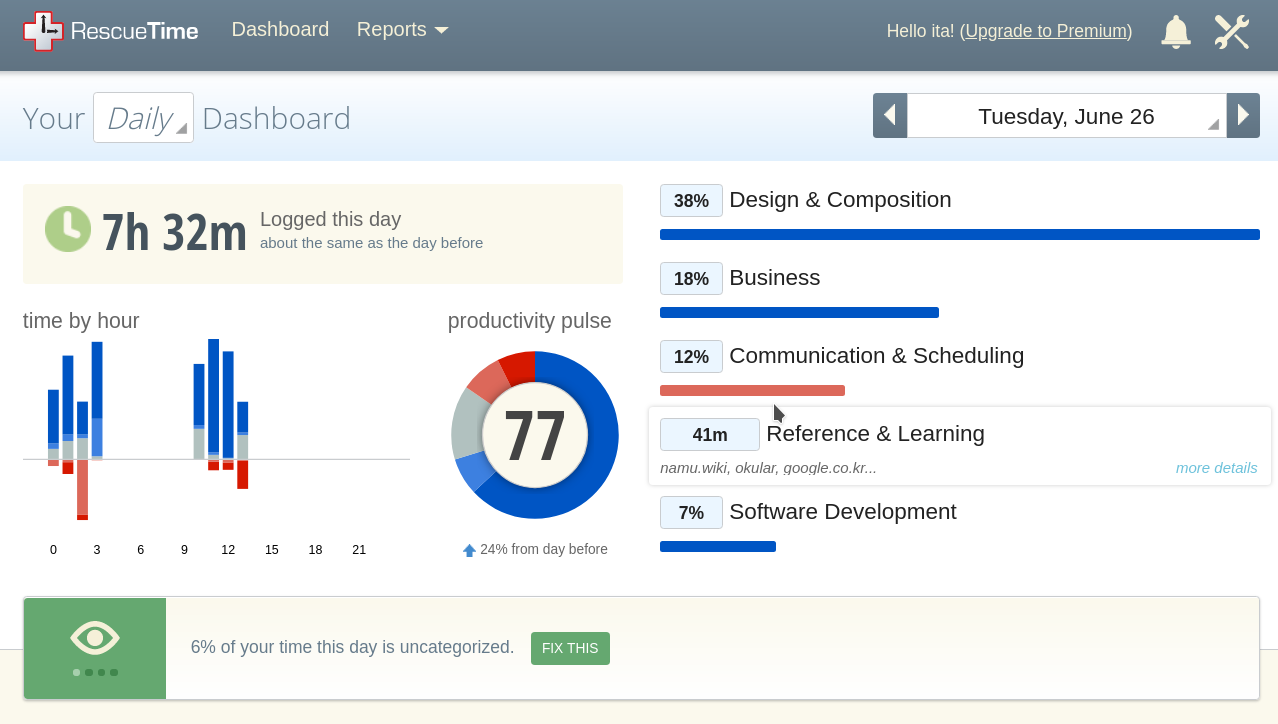
가장 놀랐던 부분은, 나는 업무시간에 한시간 이상 핸드폰을 만지며, 30분 정도를 페이스북에 이용하며, 1시간 가까이는 메일을 쓰고 받는 데에 시간을 보낸다. 물론 저 일들이 필요할 때도 있겠지만, 생각보다 너무 많은 시간을 쓸데 없는 일에 시간을 보내며, "바쁘다"고 헛소리를 하고 있었다. 왜 그랬을까? 다시 말하지만, 30분씩 4번 노는 것보다, 2시간의 시간을 확보한 뒤 2시간동안 뭉텅이로 노는 것이 훨씬 좋다! 30분은 담배를 한대 피고, 편의점에 들려서 커피를 한 잔 사 마실 수 있는 시간이지만, 2시간이면 영화를 한 편 보거나, 논문 하나를 주의깊게 읽을 수 있는 시간이다.((30분 내에 논문을 읽을 수 있는 사람이면 죄송합니다...)
업무 시간에 잡무를 최소한 줄이고, 뭉텅이로 시간을 만들어서 좀 더 생산적으로 땡땡이를 치자. 그리고, 책상에 앉은 시간= 공부한 시간이 아니라는 사실을 깨닫고, 자괴감을 느끼자. 느끼지 않으면 개선할 수 없다.
암튼, 요약하자면, 사람의 행동도 회사의 행동처럼 관리되고 개선될 수 있으며, 대부분 사람 자신을 시간을 어떻게 사용하는 지에 대해 무지하고, 이를 개선하면 생각보다 많은 시간 보너스를 얻을 수 있다.
7. Marinara [링크]
포모도로 테크닉 공식 사이트 (위키피디아) : 25분 빡겜하기 / 5분 쉬기를 반복하며, 집중을 유도하는 기술이다.
이 방법은 많이 알려져 있으므로 이 테크닉에 대한 자세한 설명은 넘어간다. 존.나.효.과.적.입.니.다
포모도로를 시도하자마자 이게 존나 좋다는 사실을 깨달았다. 다만, 딱 자리에 앉았을 때 첫 집중을 시작하기가 어려워, 어플리케이션의 힘을 빌리면 좋을 것 같아 찾아 본 와중에 이 어플리케이션을 알게 되었다. Mrinara는 Chrome web extension이며, 여태껏 사용한 포모도로 어플리케이션 중 가장 좋았다. 웹 확장 프로그램이지만, 요즘 거의 모든 근로자는 일하는 시간의 대부분을 인터넷과 함께 하니 별 문제 없을 것 같다. 크롬을 사용하지 않는다면, 뭐 다른 비슷한 프로그램이 널려 있으니 자신과 맞는 것을 찾아보자!
꿀팁 : 굳이 25분/5분을 강제로 적용할 필요는 없다. 꾸준히 수행할 수 있을 만큼의 집중 시간/ 휴식 시간을 정하는게 좋을 것 같다. 빡겜 시간과, 쉬는 시간을 조금씩 조절하며 자신에게 가장 효율적인 시간을 찾아보자. 나는 35분/8분을 사용하고 있다.
결론
많은 어플리케이션을 사용하는게 반드시 도움이 된다고는 말할 수 없다. 새로운 어플리케이션의 사용법을 배우고, 익숙해지는 데에도 생각보다 오랜 시간이 걸린다. 새로운 도구를 이용해 생산성을 높여보려는 시도가 오히려 생산성을 잡아먹기도 한다. 생각한 해결 방법중 하나는, 하나의 도구를 여러 용도로 사용하는 것이다.
- Trello를 이용해 프로젝트 관리와 개인 일정 관리를 동시에 한다.
- Nosili를 집중이 필요할 때와, 명상할 때, 그리고 낮잠을 자고 싶을 때에 사용한다. 이런 식으로...?
지금의 나도 결코 생산적인 사람이라고 말 할 수는 없다. 게으르고, 일도 잘 못하고, 아는 것도 거의 없다. 하지만 인생에서 도 중요하지만, 도 중요하다고 생각한다. 결국 조금 더 나은 사람이 되기 위해 이것저것 하는 거니까, 너무 거창하게 마음을 먹지 말고, 포기해도 좋으니까, 새로운 습관을 들이기 위해, 더 나은 사람이 되기 위한 일이다. 이런 노력을 이 글을 읽는 당신도 함께 시작해보는 것도 좋지 않을까.
Written with StackEdit.
Chitchat
How nice would it be if I could get more work done in the same amount of time? Goofing off all day and then working overtime_
I wanted to be efficient. I didn't want to work overtime. It's not that I have a lot of overtime only because I'm lazy, but...
If I became twice as efficient—if the things that take me 10 hours took 5—then I could play games for the remaining 5 hours..!(or so I thought). Then I read a book called Tools of Titans. After reading the methods mentioned there, and another blog post by this guy, Apps I Use, and forming a few habits, I learned that there were ways to work more efficiently and improve my quality of life.
Are there really ways to improve quality of life and work efficiently?...? Is this actually legit? This...? Okay? Is it okay? For real? That's what I wondered. A long time later, after an experience where I nearly died because I was truly unable to work efficiently, I somehow felt that I had to become more productive. The author and countless other people say they became more productive and efficient by using these tools. Well, I figured the writer was probably lying to sell books, but since so many people said the same thing..., I decided to try following along once.
Building new habits is really hard. No matter how positive the change, a new attempt can initially cause a drop in performance because of the J curve. It happened to me too, as expected, as expected. But after seeing all those countless comments, I decided to keep following it for just a little longer. I gave up on a lot of things too.
But, hmm... there are many tools in this world that help with good habits such as meditating, keeping a diary, or focusing on work. Now I think I've gotten more used to them than I expected. The effort to build good habits was important, but I think these tools helped me. Now I seem to have become fairly accustomed to several productivity tools, including things that are a bit of a stretch to call productivity tools.
Now I feel like I've reached the point where I can't work without these tools.
I think this result is because, um... the current me routinely handles so much work that my past self couldn't have handled it, so if I gave up these tools, I wouldn't be able to produce the same output I do now. For example, without Google Calendar I couldn't manage any of the appointments I have to keep. Without Inbox, I wouldn't be able to check the countless emails of countless kinds.
In other words, haven't I gotten better than before? Hehe...
Women who wear makeup every day say their made-up face feels like their own face, and men who wear shoe lifts every day say their height with the lifts feels like their own height...
Um... simply getting more work done isn't unconditionally good, and the absolute amount of my leisure time hasn't actually increased. The reasons are as follows.
-
I am paid by the hour, not on a project basis.
- When I finish one task, I have to do another.
- How should I rationalize this? The most important factor to me right now is growth rather than money. Both in the area I want to make my specialty and in becoming a good person as a human being. I like the changes I've seen in myself since I started managing things with productivity applications.
- When I finish one task, I have to do another.
-
I came to use my free time in chunks.
- My free time did directly increase, but I also turned little scraps of free time into solid blocks.
- Even when working for the same amount of time, batching work to create two hours of free time seems worlds apart from working at a so-so, low level of efficiency and creating four 30-minute breaks. Time I would have spent looking at Facebook or DC Inside can be turned into time to read a book or do a code review.
As an aside, I thought this resembled Memory Fragmentation, and that the resulting problem could be quite serious (because of context switching time), and it looks like research is being done on a similar topic (Time Fragmentation). Th...this is academic interconnectedness...fusion...convergence.......
- My free time did directly increase, but I also turned little scraps of free time into solid blocks.
-
The effort to use time efficiently is itself pretty fun.
- Experiences like, "I meditated again today," or "At first I could do 4 pull-ups, but now I did 10!" or "I thought it would take all day, but I finished in five hours...!" are themselves pretty enjoyable.
Applications I use often
I originally tried to divide the applications I use often into categories like time management and focus, but it didn't work well, so I just listed them straight through. For example, I use Noisli when focusing, but I also use it when meditating. I sometimes use Trello for short notes, and if I want to tell some other dude something and later get a notification from that dude again, I immediately open Inbox and send an email. Anyway, I use these applications across various layers of life, and they help me a lot.
1. Trello [link]
Trello was originally made as a tool for managing software development.
This is how I divide up my work...
The author of a book called Soft Skills said in the book that although it was software for team projects, it was also an almost perfect tool when used for personal schedule management, so I downloaded it, and it is so, so, so effective. It is much more "visual" and convenient than Todoledo? or the various other GTD tools I used.
Dividing tasks this way is (at least for me) so convenient!!
- Pros
- I can easily see visually what I'm doing.
- I can conveniently move back and forth among various categories.
- Cons
- Time-related management is inconvenient.
- Sharing my work plan with other people is inconvenient.
2. Google Calendar [link]
Actually, I always carried a planner. I just never once used it well. I was cramming into my cockroach-memory-level head how many places I had to be and how many appointments I lived with. Of course, the mountain of promises and schedules I failed to keep was more than enough to grow my self-loathing. The part that made me feel even worse was that I failed to keep the promise not because I lacked the ability, but simply because I couldn't remember it. The other person comes to think that I "wasn't capable of doing it" or that I "don't consider promises important." In truth, I have a lot of excuses I want to make, but it is true.
If you don't have the ability to remember, you can store it externally. Since I consider things with the other person important, I have to remember them by any means necessary. Thinking this way naturally led me to use this application. Oh yeah...
3. inbox [link]
I originally used Streak, and um... it was very convenient, but I switched because it showed ads. Things made directly by Google don't seem to be that high-quality at first, but when I use a Google-made application within Google services, I really love that there are no ads...! So if you keep stubbornly using it, eventually the Google product (Inbox) beats its competitor (Streak). It happened every time...
- Pros
- There is no page navigation when checking mail.
- It automatically classifies mail using statistical learning. Of course, classifications you don't like can be changed.
- I really like that it uses gamification to make you want to process mail well. I can finally do the hardest part of GTD: always keeping a clean inbox..!
- The best part is that features can be added through various other extensions.
- Cons
- It has no convenient toolbar like Outlook's, and convenient features require keyboard shortcuts.
- It forces you to use Hangouts. None of the organizations I belong to use Hangouts.
4.Noisli [link]
A friend often listens to something like ASMR?. I use it for a similar purpose. I usually studied while listening to music, but I'm gradually moving toward using Noisli. It seems to let me focus on work a little better. Honestly, it feels like I can't study at all unless I have something playing.
Also, I recently started meditating. I use Noisli when meditating too. This application also has a timer. There are apps made for meditation, like Headspace or Calm, but um... I don't particularly want guidance while meditating, and using as few applications as possible means fewer new things to get used to, so I think it may make it easier to improve productivity.
5. AppBlock [link]
There are things I want to quit but can't. Going on YouTube at lunchtime, pointlessly reading news or webtoons during work hours, cigarettes, cigarettes...
What these have in common is that I regret doing them for no reason, and if I actually hold out for a few minutes, they soon disappear from my thoughts. AppBlock is an application made to solve this problem. It is a tool that blocks specified phone applications from running during specified times.
Pro tip: If you block AppBlock with AppBlock, you can block the urge to disable the blocking all at once too.
6. RescueTime [link]
You cannot improve what you cannot measure.
Measure everything that can be measured. Make things that are difficult to measure measurable. Edward Deming
If you cannot measure it, you cannot manage it, and if you cannot manage it, you cannot improve it. Peter Drucker
They say the two quotations above are the business-management version of in physics. (I don't know if that's true.) Anyway, those two dudes were talking about companies, but a person too is (at least during working hours) a machine for achieving a goal (whether defined by oneself or someone else), and in that respect is the same as a company. I think you can manage people using the same methods used to manage companies, and improve people.
RescueTime makes it possible to measure one of the indicators that used to be impossible to measure: "how productively I spend my day" (because I can't stand beside myself watching myself work and film the process...?)! It shows me in a pretty report which applications and web pages I opened on my computer or phone and how long I used them. You can also register whether an application or web page is productive or not (there are quite a lot of default values too) and check your approximate productivity for the day.
The most surprising part was that during work hours I spend more than an hour touching my phone, around 30 minutes on Facebook, and close to an hour writing and receiving emails. Of course, those things may sometimes be necessary, but I was spending much more time than I thought on useless things while spouting nonsense about being "busy." Why did I do that? Again, securing two hours and then playing for a solid two-hour chunk is much better than playing for 30 minutes four times! Thirty minutes is enough time to smoke a cigarette, stop at a convenience store, and buy a cup of coffee, but two hours is enough to watch a movie or carefully read one paper. ((Apologies if you're someone who can read a paper within 30 minutes...)
Let's minimize miscellaneous chores during work hours, create solid blocks of time, and slack off more productively. And let's realize that time sitting at a desk =/= time spent studying, and feel self-loathing. If you don't feel it, you can't improve.
Anyway, to summarize, human behavior can also be managed and improved like company behavior, most people are ignorant of how they themselves use their time, and improving this can give you a bigger time bonus than you might think.
7. Marinara [link]
Pomodoro Technique official site (Wikipedia): A technique that encourages concentration by repeating 25 minutes of hardcore play / 5 minutes of rest.
This method is well known, so I'll skip a detailed explanation of the technique. It's. Fucking. Ef. Fec. Tive.
As soon as I tried Pomodoro, I realized it was fucking great. But it was hard to begin the first round of concentration right after sitting down, so I thought it would be good to borrow the power of an application, and I discovered this application while looking. Mrinara is a Chrome web extension, and it was the best Pomodoro application I've used so far. It's a web extension, but these days almost every worker spends most of their work time with the internet, so I don't think that's much of a problem. If you don't use Chrome, well, there are tons of other similar programs, so find one that suits you!
Pro tip: There is no need to forcibly apply 25 minutes / 5 minutes. I think it's good to set focus/rest times that you can sustain consistently. Adjust the hardcore-play time and rest time little by little and find the times that are most efficient for you. I use 35 minutes / 8 minutes.
Conclusion
I can't say that using many applications is necessarily helpful. Learning how to use a new application and getting used to it also takes longer than you might think. An attempt to increase productivity with a new tool can instead eat up productivity. One solution I thought of is to use one tool for multiple purposes.
- Use Trello for both project management and personal schedule management.
- Use Nosili when I need to focus, when meditating, and when I want to take a nap. Like this...?
Even now, I can by no means call myself a productive person. I'm lazy, bad at my job, and know almost nothing. But I think that in life, is important, but is important too. In the end, I'm doing various things to become a slightly better person, so don't set your mind on anything too grand, and it's okay to give up; it's about building new habits and becoming a better person. Wouldn't it be nice if you, reading this, started making this kind of effort too?
Written with StackEdit.
Chitchat
How nice would it be if I could get more work done in the same amount of time? Goofing off all day and then working overtime_
I wanted to be efficient. I didn't want to work overtime. It's not that I have a lot of overtime only because I'm lazy, but...
If I became twice as efficient—if the things that take me 10 hours took 5—then I could play games for the remaining 5 hours..!(or so I thought). Then I read a book called Tools of Titans. After reading the methods mentioned there, and another blog post by this guy, Apps I Use, and forming a few habits, I learned that there were ways to work more efficiently and improve my quality of life.
Are there really ways to improve quality of life and work efficiently?...? Is this actually legit? This...? Okay? Is it okay? For real? That's what I wondered. A long time later, after an experience where I nearly died because I was truly unable to work efficiently, I somehow felt that I had to become more productive. The author and countless other people say they became more productive and efficient by using these tools. Well, I figured the writer was probably lying to sell books, but since so many people said the same thing..., I decided to try following along once.
Building new habits is really hard. No matter how positive the change, a new attempt can initially cause a drop in performance because of the J curve. It happened to me too, as expected, as expected. But after seeing all those countless comments, I decided to keep following it for just a little longer. I gave up on a lot of things too.
But, hmm... there are many tools in this world that help with good habits such as meditating, keeping a diary, or focusing on work. Now I think I've gotten more used to them than I expected. The effort to build good habits was important, but I think these tools helped me. Now I seem to have become fairly accustomed to several productivity tools, including things that are a bit of a stretch to call productivity tools.
Now I feel like I've reached the point where I can't work without these tools.
I think this result is because, um... the current me routinely handles so much work that my past self couldn't have handled it, so if I gave up these tools, I wouldn't be able to produce the same output I do now. For example, without Google Calendar I couldn't manage any of the appointments I have to keep. Without Inbox, I wouldn't be able to check the countless emails of countless kinds.
In other words, haven't I gotten better than before? Hehe...
Women who wear makeup every day say their made-up face feels like their own face, and men who wear shoe lifts every day say their height with the lifts feels like their own height...
Um... simply getting more work done isn't unconditionally good, and the absolute amount of my leisure time hasn't actually increased. The reasons are as follows.
-
I am paid by the hour, not on a project basis.
- When I finish one task, I have to do another.
- How should I rationalize this? The most important factor to me right now is growth rather than money. Both in the area I want to make my specialty and in becoming a good person as a human being. I like the changes I've seen in myself since I started managing things with productivity applications.
- When I finish one task, I have to do another.
-
I came to use my free time in chunks.
- My free time did directly increase, but I also turned little scraps of free time into solid blocks.
- Even when working for the same amount of time, batching work to create two hours of free time seems worlds apart from working at a so-so, low level of efficiency and creating four 30-minute breaks. Time I would have spent looking at Facebook or DC Inside can be turned into time to read a book or do a code review.
As an aside, I thought this resembled Memory Fragmentation, and that the resulting problem could be quite serious (because of context switching time), and it looks like research is being done on a similar topic (Time Fragmentation). Th...this is academic interconnectedness...fusion...convergence.......
- My free time did directly increase, but I also turned little scraps of free time into solid blocks.
-
The effort to use time efficiently is itself pretty fun.
- Experiences like, "I meditated again today," or "At first I could do 4 pull-ups, but now I did 10!" or "I thought it would take all day, but I finished in five hours...!" are themselves pretty enjoyable.
Applications I use often
I originally tried to divide the applications I use often into categories like time management and focus, but it didn't work well, so I just listed them straight through. For example, I use Noisli when focusing, but I also use it when meditating. I sometimes use Trello for short notes, and if I want to tell some other dude something and later get a notification from that dude again, I immediately open Inbox and send an email. Anyway, I use these applications across various layers of life, and they help me a lot.
1. Trello [link]
Trello was originally made as a tool for managing software development.
This is how I divide up my work...
The author of a book called Soft Skills said in the book that although it was software for team projects, it was also an almost perfect tool when used for personal schedule management, so I downloaded it, and it is so, so, so effective. It is much more "visual" and convenient than Todoledo? or the various other GTD tools I used.
Dividing tasks this way is (at least for me) so convenient!!
- Pros
- I can easily see visually what I'm doing.
- I can conveniently move back and forth among various categories.
- Cons
- Time-related management is inconvenient.
- Sharing my work plan with other people is inconvenient.
2. Google Calendar [link]
Actually, I always carried a planner. I just never once used it well. I was cramming into my cockroach-memory-level head how many places I had to be and how many appointments I lived with. Of course, the mountain of promises and schedules I failed to keep was more than enough to grow my self-loathing. The part that made me feel even worse was that I failed to keep the promise not because I lacked the ability, but simply because I couldn't remember it. The other person comes to think that I "wasn't capable of doing it" or that I "don't consider promises important." In truth, I have a lot of excuses I want to make, but it is true.
If you don't have the ability to remember, you can store it externally. Since I consider things with the other person important, I have to remember them by any means necessary. Thinking this way naturally led me to use this application. Oh yeah...
3. inbox [link]
I originally used Streak, and um... it was very convenient, but I switched because it showed ads. Things made directly by Google don't seem to be that high-quality at first, but when I use a Google-made application within Google services, I really love that there are no ads...! So if you keep stubbornly using it, eventually the Google product (Inbox) beats its competitor (Streak). It happened every time...
- Pros
- There is no page navigation when checking mail.
- It automatically classifies mail using statistical learning. Of course, classifications you don't like can be changed.
- I really like that it uses gamification to make you want to process mail well. I can finally do the hardest part of GTD: always keeping a clean inbox..!
- The best part is that features can be added through various other extensions.
- Cons
- It has no convenient toolbar like Outlook's, and convenient features require keyboard shortcuts.
- It forces you to use Hangouts. None of the organizations I belong to use Hangouts.
4.Noisli [link]
A friend often listens to something like ASMR?. I use it for a similar purpose. I usually studied while listening to music, but I'm gradually moving toward using Noisli. It seems to let me focus on work a little better. Honestly, it feels like I can't study at all unless I have something playing.
Also, I recently started meditating. I use Noisli when meditating too. This application also has a timer. There are apps made for meditation, like Headspace or Calm, but um... I don't particularly want guidance while meditating, and using as few applications as possible means fewer new things to get used to, so I think it may make it easier to improve productivity.
5. AppBlock [link]
There are things I want to quit but can't. Going on YouTube at lunchtime, pointlessly reading news or webtoons during work hours, cigarettes, cigarettes...
What these have in common is that I regret doing them for no reason, and if I actually hold out for a few minutes, they soon disappear from my thoughts. AppBlock is an application made to solve this problem. It is a tool that blocks specified phone applications from running during specified times.
Pro tip: If you block AppBlock with AppBlock, you can block the urge to disable the blocking all at once too.
6. RescueTime [link]
You cannot improve what you cannot measure.
Measure everything that can be measured. Make things that are difficult to measure measurable. Edward Deming
If you cannot measure it, you cannot manage it, and if you cannot manage it, you cannot improve it. Peter Drucker
They say the two quotations above are the business-management version of in physics. (I don't know if that's true.) Anyway, those two dudes were talking about companies, but a person too is (at least during working hours) a machine for achieving a goal (whether defined by oneself or someone else), and in that respect is the same as a company. I think you can manage people using the same methods used to manage companies, and improve people.
RescueTime makes it possible to measure one of the indicators that used to be impossible to measure: "how productively I spend my day" (because I can't stand beside myself watching myself work and film the process...?)! It shows me in a pretty report which applications and web pages I opened on my computer or phone and how long I used them. You can also register whether an application or web page is productive or not (there are quite a lot of default values too) and check your approximate productivity for the day.
The most surprising part was that during work hours I spend more than an hour touching my phone, around 30 minutes on Facebook, and close to an hour writing and receiving emails. Of course, those things may sometimes be necessary, but I was spending much more time than I thought on useless things while spouting nonsense about being "busy." Why did I do that? Again, securing two hours and then playing for a solid two-hour chunk is much better than playing for 30 minutes four times! Thirty minutes is enough time to smoke a cigarette, stop at a convenience store, and buy a cup of coffee, but two hours is enough to watch a movie or carefully read one paper. ((Apologies if you're someone who can read a paper within 30 minutes...)
Let's minimize miscellaneous chores during work hours, create solid blocks of time, and slack off more productively. And let's realize that time sitting at a desk =/= time spent studying, and feel self-loathing. If you don't feel it, you can't improve.
Anyway, to summarize, human behavior can also be managed and improved like company behavior, most people are ignorant of how they themselves use their time, and improving this can give you a bigger time bonus than you might think.
7. Marinara [link]
Pomodoro Technique official site (Wikipedia): A technique that encourages concentration by repeating 25 minutes of hardcore play / 5 minutes of rest.
This method is well known, so I'll skip a detailed explanation of the technique. It's. Fucking. Ef. Fec. Tive.
As soon as I tried Pomodoro, I realized it was fucking great. But it was hard to begin the first round of concentration right after sitting down, so I thought it would be good to borrow the power of an application, and I discovered this application while looking. Mrinara is a Chrome web extension, and it was the best Pomodoro application I've used so far. It's a web extension, but these days almost every worker spends most of their work time with the internet, so I don't think that's much of a problem. If you don't use Chrome, well, there are tons of other similar programs, so find one that suits you!
Pro tip: There is no need to forcibly apply 25 minutes / 5 minutes. I think it's good to set focus/rest times that you can sustain consistently. Adjust the hardcore-play time and rest time little by little and find the times that are most efficient for you. I use 35 minutes / 8 minutes.
Conclusion
I can't say that using many applications is necessarily helpful. Learning how to use a new application and getting used to it also takes longer than you might think. An attempt to increase productivity with a new tool can instead eat up productivity. One solution I thought of is to use one tool for multiple purposes.
- Use Trello for both project management and personal schedule management.
- Use Nosili when I need to focus, when meditating, and when I want to take a nap. Like this...?
Even now, I can by no means call myself a productive person. I'm lazy, bad at my job, and know almost nothing. But I think that in life, is important, but is important too. In the end, I'm doing various things to become a slightly better person, so don't set your mind on anything too grand, and it's okay to give up; it's about building new habits and becoming a better person. Wouldn't it be nice if you, reading this, started making this kind of effort too?
Written with StackEdit.
Chitchat
How nice would it be if I could get more work done in the same amount of time? Goofing off all day and then working overtime_
I wanted to be efficient. I didn't want to work overtime. It's not that I have a lot of overtime only because I'm lazy, but...
If I became twice as efficient—if the things that take me 10 hours took 5—then I could play games for the remaining 5 hours..!(or so I thought). Then I read a book called Tools of Titans. After reading the methods mentioned there, and another blog post by this guy, Apps I Use, and forming a few habits, I learned that there were ways to work more efficiently and improve my quality of life.
Are there really ways to improve quality of life and work efficiently?...? Is this actually legit? This...? Okay? Is it okay? For real? That's what I wondered. A long time later, after an experience where I nearly died because I was truly unable to work efficiently, I somehow felt that I had to become more productive. The author and countless other people say they became more productive and efficient by using these tools. Well, I figured the writer was probably lying to sell books, but since so many people said the same thing..., I decided to try following along once.
Building new habits is really hard. No matter how positive the change, a new attempt can initially cause a drop in performance because of the J curve. It happened to me too, as expected, as expected. But after seeing all those countless comments, I decided to keep following it for just a little longer. I gave up on a lot of things too.
But, hmm... there are many tools in this world that help with good habits such as meditating, keeping a diary, or focusing on work. Now I think I've gotten more used to them than I expected. The effort to build good habits was important, but I think these tools helped me. Now I seem to have become fairly accustomed to several productivity tools, including things that are a bit of a stretch to call productivity tools.
Now I feel like I've reached the point where I can't work without these tools.
I think this result is because, um... the current me routinely handles so much work that my past self couldn't have handled it, so if I gave up these tools, I wouldn't be able to produce the same output I do now. For example, without Google Calendar I couldn't manage any of the appointments I have to keep. Without Inbox, I wouldn't be able to check the countless emails of countless kinds.
In other words, haven't I gotten better than before? Hehe...
Women who wear makeup every day say their made-up face feels like their own face, and men who wear shoe lifts every day say their height with the lifts feels like their own height...
Um... simply getting more work done isn't unconditionally good, and the absolute amount of my leisure time hasn't actually increased. The reasons are as follows.
-
I am paid by the hour, not on a project basis.
- When I finish one task, I have to do another.
- How should I rationalize this? The most important factor to me right now is growth rather than money. Both in the area I want to make my specialty and in becoming a good person as a human being. I like the changes I've seen in myself since I started managing things with productivity applications.
- When I finish one task, I have to do another.
-
I came to use my free time in chunks.
- My free time did directly increase, but I also turned little scraps of free time into solid blocks.
- Even when working for the same amount of time, batching work to create two hours of free time seems worlds apart from working at a so-so, low level of efficiency and creating four 30-minute breaks. Time I would have spent looking at Facebook or DC Inside can be turned into time to read a book or do a code review.
As an aside, I thought this resembled Memory Fragmentation, and that the resulting problem could be quite serious (because of context switching time), and it looks like research is being done on a similar topic (Time Fragmentation). Th...this is academic interconnectedness...fusion...convergence.......
- My free time did directly increase, but I also turned little scraps of free time into solid blocks.
-
The effort to use time efficiently is itself pretty fun.
- Experiences like, "I meditated again today," or "At first I could do 4 pull-ups, but now I did 10!" or "I thought it would take all day, but I finished in five hours...!" are themselves pretty enjoyable.
Applications I use often
I originally tried to divide the applications I use often into categories like time management and focus, but it didn't work well, so I just listed them straight through. For example, I use Noisli when focusing, but I also use it when meditating. I sometimes use Trello for short notes, and if I want to tell some other dude something and later get a notification from that dude again, I immediately open Inbox and send an email. Anyway, I use these applications across various layers of life, and they help me a lot.
1. Trello [link]
Trello was originally made as a tool for managing software development.
This is how I divide up my work...
The author of a book called Soft Skills said in the book that although it was software for team projects, it was also an almost perfect tool when used for personal schedule management, so I downloaded it, and it is so, so, so effective. It is much more "visual" and convenient than Todoledo? or the various other GTD tools I used.
Dividing tasks this way is (at least for me) so convenient!!
- Pros
- I can easily see visually what I'm doing.
- I can conveniently move back and forth among various categories.
- Cons
- Time-related management is inconvenient.
- Sharing my work plan with other people is inconvenient.
2. Google Calendar [link]
Actually, I always carried a planner. I just never once used it well. I was cramming into my cockroach-memory-level head how many places I had to be and how many appointments I lived with. Of course, the mountain of promises and schedules I failed to keep was more than enough to grow my self-loathing. The part that made me feel even worse was that I failed to keep the promise not because I lacked the ability, but simply because I couldn't remember it. The other person comes to think that I "wasn't capable of doing it" or that I "don't consider promises important." In truth, I have a lot of excuses I want to make, but it is true.
If you don't have the ability to remember, you can store it externally. Since I consider things with the other person important, I have to remember them by any means necessary. Thinking this way naturally led me to use this application. Oh yeah...
3. inbox [link]
I originally used Streak, and um... it was very convenient, but I switched because it showed ads. Things made directly by Google don't seem to be that high-quality at first, but when I use a Google-made application within Google services, I really love that there are no ads...! So if you keep stubbornly using it, eventually the Google product (Inbox) beats its competitor (Streak). It happened every time...
- Pros
- There is no page navigation when checking mail.
- It automatically classifies mail using statistical learning. Of course, classifications you don't like can be changed.
- I really like that it uses gamification to make you want to process mail well. I can finally do the hardest part of GTD: always keeping a clean inbox..!
- The best part is that features can be added through various other extensions.
- Cons
- It has no convenient toolbar like Outlook's, and convenient features require keyboard shortcuts.
- It forces you to use Hangouts. None of the organizations I belong to use Hangouts.
4.Noisli [link]
A friend often listens to something like ASMR?. I use it for a similar purpose. I usually studied while listening to music, but I'm gradually moving toward using Noisli. It seems to let me focus on work a little better. Honestly, it feels like I can't study at all unless I have something playing.
Also, I recently started meditating. I use Noisli when meditating too. This application also has a timer. There are apps made for meditation, like Headspace or Calm, but um... I don't particularly want guidance while meditating, and using as few applications as possible means fewer new things to get used to, so I think it may make it easier to improve productivity.
5. AppBlock [link]
There are things I want to quit but can't. Going on YouTube at lunchtime, pointlessly reading news or webtoons during work hours, cigarettes, cigarettes...
What these have in common is that I regret doing them for no reason, and if I actually hold out for a few minutes, they soon disappear from my thoughts. AppBlock is an application made to solve this problem. It is a tool that blocks specified phone applications from running during specified times.
Pro tip: If you block AppBlock with AppBlock, you can block the urge to disable the blocking all at once too.
6. RescueTime [link]
You cannot improve what you cannot measure.
Measure everything that can be measured. Make things that are difficult to measure measurable. Edward Deming
If you cannot measure it, you cannot manage it, and if you cannot manage it, you cannot improve it. Peter Drucker
They say the two quotations above are the business-management version of in physics. (I don't know if that's true.) Anyway, those two dudes were talking about companies, but a person too is (at least during working hours) a machine for achieving a goal (whether defined by oneself or someone else), and in that respect is the same as a company. I think you can manage people using the same methods used to manage companies, and improve people.
RescueTime makes it possible to measure one of the indicators that used to be impossible to measure: "how productively I spend my day" (because I can't stand beside myself watching myself work and film the process...?)! It shows me in a pretty report which applications and web pages I opened on my computer or phone and how long I used them. You can also register whether an application or web page is productive or not (there are quite a lot of default values too) and check your approximate productivity for the day.
The most surprising part was that during work hours I spend more than an hour touching my phone, around 30 minutes on Facebook, and close to an hour writing and receiving emails. Of course, those things may sometimes be necessary, but I was spending much more time than I thought on useless things while spouting nonsense about being "busy." Why did I do that? Again, securing two hours and then playing for a solid two-hour chunk is much better than playing for 30 minutes four times! Thirty minutes is enough time to smoke a cigarette, stop at a convenience store, and buy a cup of coffee, but two hours is enough to watch a movie or carefully read one paper. ((Apologies if you're someone who can read a paper within 30 minutes...)
Let's minimize miscellaneous chores during work hours, create solid blocks of time, and slack off more productively. And let's realize that time sitting at a desk =/= time spent studying, and feel self-loathing. If you don't feel it, you can't improve.
Anyway, to summarize, human behavior can also be managed and improved like company behavior, most people are ignorant of how they themselves use their time, and improving this can give you a bigger time bonus than you might think.
7. Marinara [link]
Pomodoro Technique official site (Wikipedia): A technique that encourages concentration by repeating 25 minutes of hardcore play / 5 minutes of rest.
This method is well known, so I'll skip a detailed explanation of the technique. It's. Fucking. Ef. Fec. Tive.
As soon as I tried Pomodoro, I realized it was fucking great. But it was hard to begin the first round of concentration right after sitting down, so I thought it would be good to borrow the power of an application, and I discovered this application while looking. Mrinara is a Chrome web extension, and it was the best Pomodoro application I've used so far. It's a web extension, but these days almost every worker spends most of their work time with the internet, so I don't think that's much of a problem. If you don't use Chrome, well, there are tons of other similar programs, so find one that suits you!
Pro tip: There is no need to forcibly apply 25 minutes / 5 minutes. I think it's good to set focus/rest times that you can sustain consistently. Adjust the hardcore-play time and rest time little by little and find the times that are most efficient for you. I use 35 minutes / 8 minutes.
Conclusion
I can't say that using many applications is necessarily helpful. Learning how to use a new application and getting used to it also takes longer than you might think. An attempt to increase productivity with a new tool can instead eat up productivity. One solution I thought of is to use one tool for multiple purposes.
- Use Trello for both project management and personal schedule management.
- Use Nosili when I need to focus, when meditating, and when I want to take a nap. Like this...?
Even now, I can by no means call myself a productive person. I'm lazy, bad at my job, and know almost nothing. But I think that in life, is important, but is important too. In the end, I'm doing various things to become a slightly better person, so don't set your mind on anything too grand, and it's okay to give up; it's about building new habits and becoming a better person. Wouldn't it be nice if you, reading this, started making this kind of effort too?
Written with StackEdit.
Comments